Claude Code, Command by Command — Part 1: The Commands You Use Every Day
A simple, practical series for anyone who installed Claude Code, pressed /, and felt lost.
When you press / in Claude Code, around eighty commands show up. That's a lot, and most guides make it worse by listing them A to Z. But you don't use commands alphabetically. You use them in the order your work happens: you set up a project, you do the work, you check it, and you come back to it later.
So that’s how we’ll learn them. This first part covers the commands you’ll use in almost every session. Get these, and you’re no longer guessing.
One quick idea first. A prompt is the work you ask for (“fix this bug”). A command controls the session itself (“which model am I on?”, “how much room is left?”). Commands start with / and only work at the very start of a message.
Here’s the whole map. We’ll walk through it stage by stage.
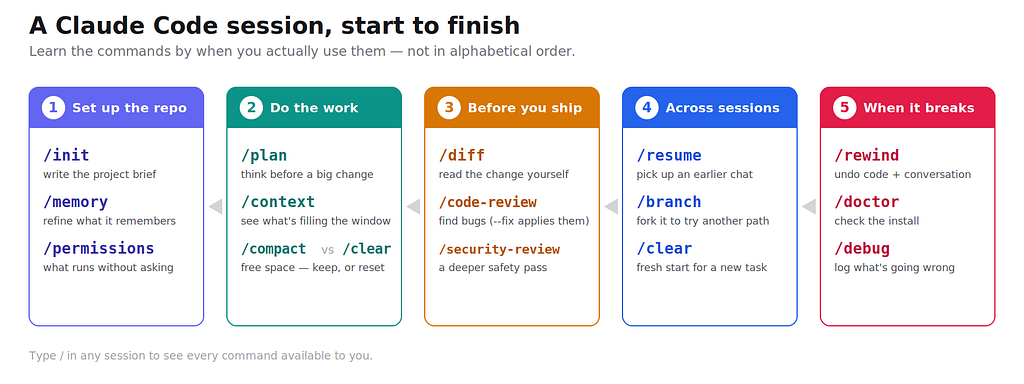
The five moments of a session, and the commands that belong to each.
Starting from your terminal
Before any / command, you open Claude from the terminal:
claude                    # start a session here
claude -c                 # continue your last session in this folder
claude -r "my-feature"    # resume a session by name or ID
claude -c is the one you'll type most: it drops you back into your last session in the current project, with the full history. Name your sessions and resuming gets easy.
Stage 1 — Set up the repo
Do this once per project. It pays off in every session after.
/init — reads your codebase and writes a CLAUDE.md file: a short brief Claude loads every time you work here (your stack, your conventions, how to run tests). This one file shapes the quality of everything later.
/memory — edit that brief. When Claude keeps getting something wrong, fix it here so it sticks.
/permissions — decide what runs without asking. Let git status run freely, keep rm behind a prompt. Set this early and the constant confirmations stop.
Stage 2 — Do the work
This is where most of your time goes.
/plan — makes Claude think before it touches anything. For any change bigger than one file, start here.
/plan move the auth logic to the new session API
Claude proposes an approach, you approve or adjust, then it builds.
/model — switch which model you're using (sonnet, opus, haiku, fable). No argument opens a picker.
/effort — set how hard the model thinks: low, medium, high, and up. A tricky bug wants high effort; renaming a variable doesn't. These are two different dials — /model is which brain, /effort is how hard it works.
/context — shows what's filling your context window as a colored grid. Run it when a session feels slow or forgetful, so you know what to fix before you fix it.
/compact and /clear — these look the same and do opposite things. This is the one distinction worth memorizing:
Same task, just need room? /compact. New task? /clear.
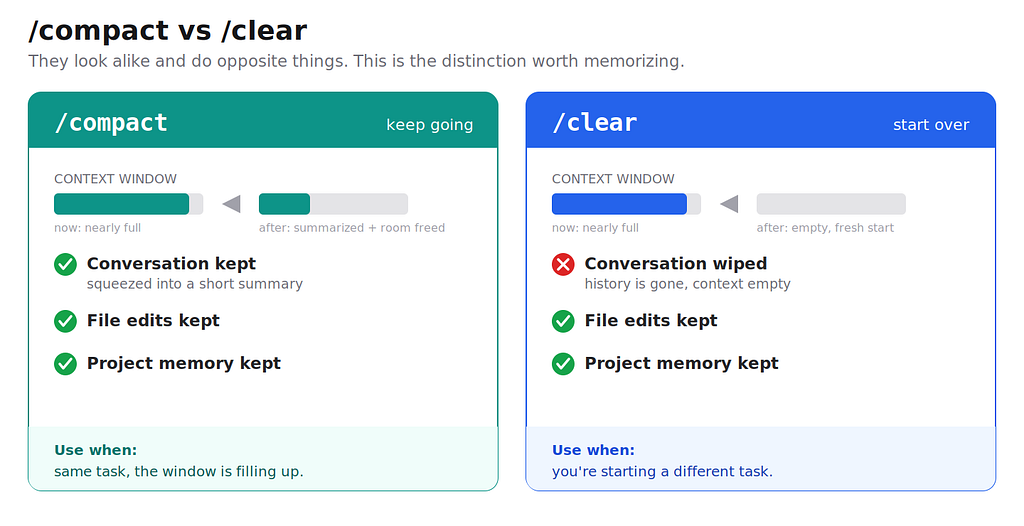
The common mistake is using /clear when you meant /compact, and losing context you needed.
/btw — ask a quick side question without it cluttering the main conversation. Good for "wait, what does this flag do?" moments.
Stage 3 — Before you ship
Check the change before your reviewer has to.
/diff — opens a viewer of your uncommitted changes. The fastest way to see what this session actually touched.
/code-review — checks your changes for bugs and cleanups. The useful part is the options:
/code-review --fix # finds problems AND applies the fixes
/security-review — a deeper, read-only safety pass. Run it when the change touches auth, user input, or the database.
Stage 4 — Across sessions
Real work spans days.
/resume — go back to an earlier conversation by name, ID, or a picker.
/branch — fork the current chat to try a different direction without losing where you are. If the new path fails, /resume back.
/clear — start fresh for a new, unrelated task. Your files and your CLAUDE.md stay; only the chat resets.
Stage 5 — When something breaks
/rewind — rolls back both the code and the conversation to an earlier point. This is your undo button, and knowing it's there lets you experiment without fear.
/doctor — checks your installation and offers to fix what it finds.
/debug — turns on logging to investigate a problem with Claude Code itself.
And three quick checks: /help (list commands), /status (version, model, account), /usage (cost and your plan limits).
The cheat sheet
Command Use it to… claude -c Continue your last session here /init Create the project brief (CLAUDE.md) /memory Fix what Claude remembers /permissions Set what runs without asking /plan Think before a big change /model Switch model /effort Set how hard it thinks /context See what's filling the window /compact Free space, keep the same task /clear Fresh start for a new task /btw Ask an aside without clutter /diff Review your changes /code-review Find bugs (--fix applies them) /security-review Deeper safety check /resume / /branch Return to, or fork, a chat /rewind Undo code + conversation /doctor / /debug Fix Claude Code itself
The takeaway
You don’t need to memorize all eighty commands. Four instincts cover most of it: /compact and /clear are opposites, /model and /effort are separate dials, /context tells you when to act, and /rewind makes mistakes cheap. That's the difference between fighting the menu and driving the tool.
Next up — Part 2: Context and memory. How to write a CLAUDE.md that actually helps, how Claude's memory works, and what survives a /compact.
One note: not every command shows for every user — some depend on your plan or version. Type / in a session to see exactly what you have.