Claude Code, Command by Command — Part 2: Context and Memory
Part 2 of a simple, practical series. Part 1 covered the everyday commands. This one is about the thing that quietly decides whether a session goes well: what Claude knows, and what it forgets.
Every Claude Code session starts with an empty head. It doesn’t remember yesterday’s conversation. So the real skill isn’t typing better prompts — it’s managing what Claude knows at the start of a session, and what it holds onto as the session runs long.
There are two halves to this. Memory carries knowledge across sessions. Context is the working space inside one session. Get both right and Claude feels like a teammate who already knows your project. Get them wrong and it re-learns everything every morning, then slowly forgets it by lunch.
Let’s take them one at a time.
The two kinds of memory
Claude Code remembers your project in two ways, and they’re easy to mix up. One you write. One Claude writes.
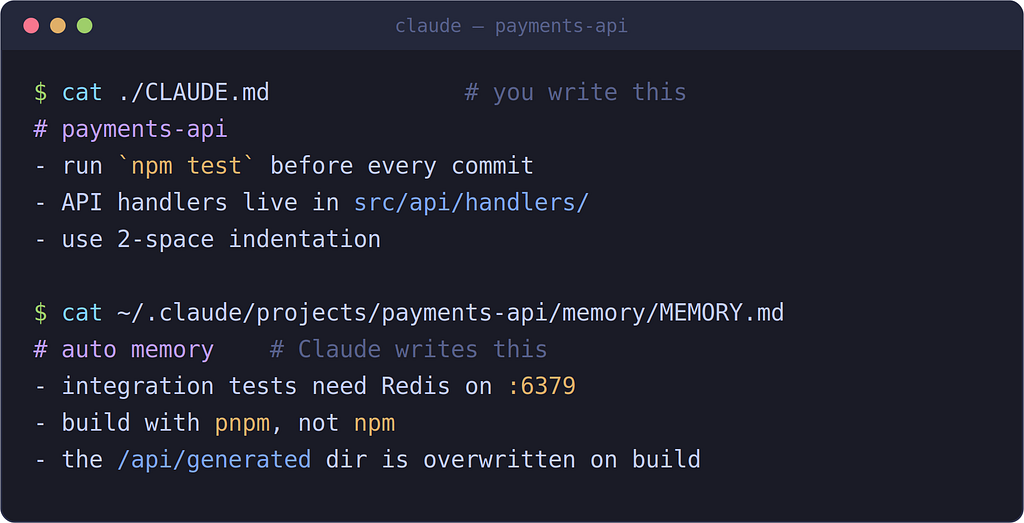
You write the rules. Claude writes down what it learns. Both load at the start of every session.
CLAUDE.md is a plain text file you write. Claude reads it at the start of every session. Think of it as the note you'd otherwise re-type each day: your build commands, your conventions, where things live, the "always do X" rules.
Auto memory is the opposite direction: Claude takes its own notes as it works, and reads them back next time. You don’t write these — Claude decides what’s worth keeping.
You’ll use both. The rest of this part is how.
Writing a CLAUDE.md that actually helps
Start by generating one. In a repo, run /init and Claude reads your codebase and writes a first draft — build commands, test setup, conventions it can spot. If a CLAUDE.md already exists, /init suggests improvements instead of overwriting it.
Then make it good. Two rules carry most of the weight:
Be specific. Vague instructions get ignored. Concrete ones get followed.
- “Use 2-space indentation” beats “format code properly”
- “Run npm test before committing" beats "test your changes"
- “API handlers live in src/api/handlers/" beats "keep files organized"
Keep it short. Aim for under ~200 lines. The whole file loads into context every session, so a bloated CLAUDE.md costs you on every message and gets followed less reliably. If you catch yourself writing a long procedure, that belongs in a skill, not here.
A good test for what goes in: did you type the same correction last session? If yes, write it down. If a code review caught something Claude should have known, write that down too.
Where the file lives
CLAUDE.md can sit at four different levels, from org-wide down to just-you-just-this-project. They all load, broad to specific, and the more specific one wins a conflict.
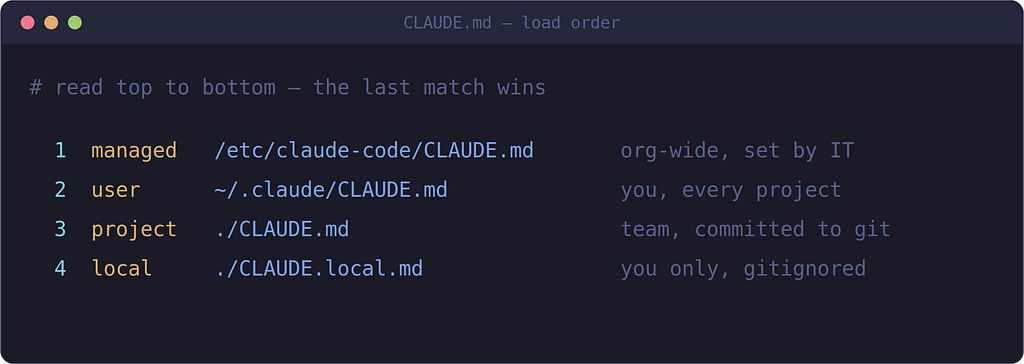
Four places a CLAUDE.md can live. Most of the time you’ll use Project (shared with your team) and maybe Local (just you).
For most people it’s simple: put team rules in ./CLAUDE.md and commit it. Put your personal, machine-specific notes in ./CLAUDE.local.md and add it to .gitignore.
To edit any of these later, run /memory. It lists every memory file loaded in your session — useful when Claude ignores a rule and you want to check the file is even being read.
Auto memory: the notes Claude takes itself
This is the part people don’t realize is happening. As Claude works, it quietly saves things worth remembering — a build quirk, a fix for an obscure error, a preference you stated. Next session, it reads them back. You’ll see “Writing memory” or “Recalled memory” flash by when it does.
It’s on by default, and it’s stored on your machine, one folder per repository. It is not synced to the cloud or shared across machines — it’s local, fast, and yours to inspect.
You can nudge it directly. Just say:
remember that the integration tests need Redis running locally
and Claude saves it. One habit worth building: after a few sessions on a new project, run /memory, open the memory folder, and skim what's been saved. A wrong note will quietly repeat itself in every future session until you fix it, and fixing it takes ten seconds.
Managing context inside a session
Memory is across sessions. Context is the single session you’re in right now — and it’s a fixed budget. Everything Claude reads (your files, command output, the conversation itself) fills it up. As it fills, answers get vaguer and Claude starts forgetting things from earlier. There’s even a name for it: context rot.
Two commands keep this under control, both from Part 1:
/context shows you where the space is going, as a colored grid. Run it when a session feels off — it tells you whether the problem is a bloated file, too much old tool output, or just a long conversation.
/compact summarizes the conversation to free up room while keeping the same task alive. /clear wipes it for a fresh task. (That distinction was the heart of Part 1.)
Here’s the part worth knowing: Claude also compacts on its own as you near the limit. You don’t trigger it, and it can flatten things you cared about. So it matters what survives.
What survives a compaction
When the conversation gets summarized — by you or automatically — not everything makes it through intact.
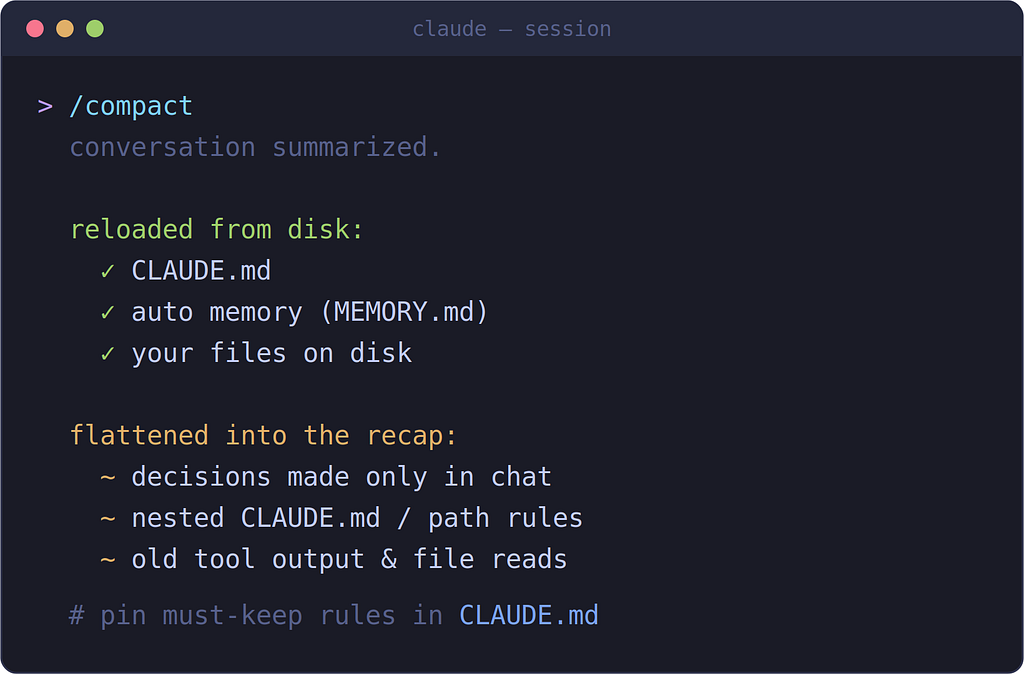
Anything saved to disk comes back. Anything that lived only in the chat can get flattened into a summary.
The pattern is simple once you see it: things saved to a file survive; things that only existed in the conversation might not. Your project-root CLAUDE.md gets re-read from disk. Auto memory reloads. Your files are untouched. But a decision you made out loud thirty minutes ago — "let's handle auth in middleware, not per-route" — can get summarized into a vaguer shape, or lost.
Two ways to protect what matters:
- Write it down. If a rule must always hold, it belongs in CLAUDE.md, not in the chat. That's the whole reason the file survives compaction.
- Steer the summary. Run /compact focus on the auth refactor and the summary is built around what you named. You can make this automatic by adding a ## Compact Instructions section to your CLAUDE.md.
When Claude seems to “forget” something mid-session, your two debugging tools are /memory (what files loaded?) and /context (what's eating the window?).
The cheat sheet
Command Use it to… /init Generate a starter CLAUDE.md from your code /memory See loaded memory files, edit them, toggle auto memory /context See what's filling the context window /compact Summarize to free room (focus on… to steer it) /clear Wipe the chat for a new task say "remember that…" Save a note to auto memory
And the two-line mental model:
- CLAUDE.md = rules you write, loaded every session, survives compaction. Keep it short and specific.
- Auto memory = notes Claude writes itself, stored locally, also reloads. Review it now and then.
The takeaway
Most “Claude forgot what I told it” problems aren’t bugs — they’re a note that lived in the chat instead of in a file. Put durable rules in CLAUDE.md, let auto memory handle the rest, and use /context and /memory to see what's actually loaded. That's the whole game.
Next up — Part 3: Running Claude Code without the chat. Headless mode (claude -p), piping files in, structured output, and putting Claude into a script or CI pipeline. This is where Claude Code stops being a chat window and becomes a tool you build on.
As always: features move fast. Run /memory and /context in your own session to see exactly how yours is set up, and check the official docs for anything version-specific.