How AI Coding Agents Changed the Way I Build Android Apps
A practical field guide to Claude Code, Cursor, and Gemini in Android Studio, where the real speedups are, and where the hype quietly falls apart.
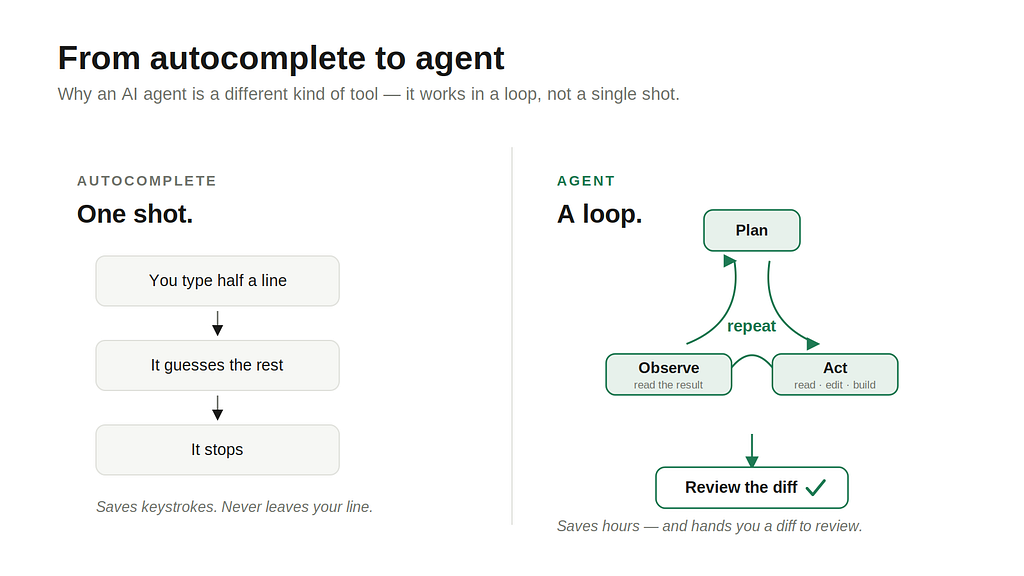
A year ago, AI in Android development meant autocomplete. You typed half a line, the model guessed the rest, you hit Tab, and that was the relationship. Useful, but small. It saved keystrokes, not hours.
That relationship has changed. The tools I use now don’t wait for me to write the first half of anything. I describe a feature in plain language — “add a search bar to the contacts screen that filters as the user types, backed by the existing ContactsViewModel" — and the agent reads the relevant files, writes the Composable, wires it into the ViewModel, fixes the import it forgot, builds the project, and hands me a diff to review. Sometimes it's wrong. Often it's faster than I would have been. Either way, the unit of work has shifted from "a line of code" to "a task."
That shift is what people mean when they say agentic. And for Android specifically, 2026 is the first year it actually holds up under real project pressure. This is a tour of what works, written for two kinds of readers at once: engineers who want to know which tool to open tomorrow, and product folks who want to understand what changes when their team starts shipping this way.
What “agent” actually means here
Skip this part if you live in a terminal. For everyone else, it’s worth being precise, because the word agent is doing a lot of marketing work right now.
An AI coding agent is a model wrapped in a loop. Instead of answering a question once and stopping, it plans, takes an action (read a file, edit code, run a build), looks at the result, and decides what to do next. It keeps going until the task is done or it gets stuck. The model is the brain; the loop and the tools around it are what make it an agent rather than a chatbot.
The practical consequence: you delegate outcomes, not instructions. You stop saying “write a function that does X” and start saying “make the login screen remember the last email,” then review what comes back. It’s closer to working with a fast, slightly overconfident junior engineer than to using a smarter autocomplete.
The three tools worth knowing
There are dozens of these now. For Android, three matter most, and they occupy different corners of the workflow.
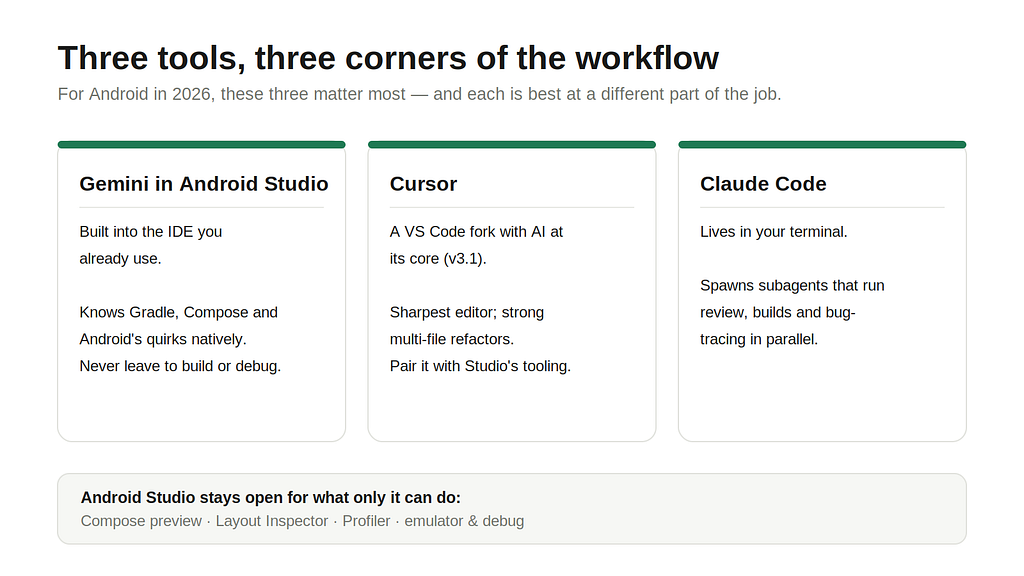
Gemini in Android Studio is the one Google builds into the IDE you already use. Its Agent Mode is no longer an experiment — it ships in stable Android Studio, handles multi-file tasks, and reads your project the way the IDE does, which means it understands Gradle, Compose, and Android’s quirks natively. There’s a New Project Assistant that scaffolds an app from a description, and you can shape the agent’s behavior with an AGENTS.md file in your repo. The headline advantage is that it never leaves the tool where you build and debug. No context-switching, and it knows what a BuildConfig error means without being told.
Cursor is a fork of VS Code with AI built into its core, currently on version 3.1. Developers love it for the editing experience — its agent mode handles refactors across a codebase well, and many people find its inline edits sharper than anything else. The catch, and it’s a real one for Android, is that Cursor is not Android Studio. There’s no Compose preview, no Layout Inspector, no Profiler inside it. You write and refactor in Cursor and keep Studio open for the Android-specific tooling, or you lean on the command line (more on that below).
Claude Code lives in your terminal. You run claude inside a project directory and talk to it. It reads the whole codebase, plans, edits across many files, runs your tests, and iterates on failures. Its differentiator in 2026 is orchestration: it can spin up subagents — separate workers with their own context and permissions — so a lead agent handles planning while specialists do code review, run the build, or trace a bug in parallel. For a large Android feature that splits cleanly into a data layer, a UI layer, and tests, that parallelism genuinely compresses the calendar.
These aren’t mutually exclusive. A common setup right now is Cursor as the editor with Claude Code (or Cline) running inside it as the agent, and Android Studio open on a second monitor for the emulator and profiler. Three tools, one job, each doing the part it’s best at.
A real workflow, start to finish
Here’s roughly how building a feature goes for me now. Say the task is a “favorites” screen that lets users star contacts.
I start by giving the agent context, not just a command. In a repo with a CLAUDE.md or AGENTS.md file, I've already written down the rules of the house:
# Project conventions
- Kotlin + Jetpack Compose, single-activity architecture
- State via ViewModel + StateFlow, no LiveData
- DI with Hilt, networking with Retrofit
- Run `./gradlew lintDebug` before declaring a task done
That file gets read on every request, so I don’t repeat myself, and the generated code matches the codebase instead of inventing a parallel style. This one habit removes most of the “the AI wrote code that doesn’t look like ours” complaints.
Then the prompt itself:
Add a Favorites screen. Users tap a star on any contact to favorite it.
Favorites persist locally with Room. Reuse ContactRepository.
Add a bottom-nav tab for it. Follow the existing ContactsScreen pattern.
The agent plans, touches maybe six files, and shows me a diff. I read it like a code review — because that’s exactly what it is. Where it guessed wrong (it picked the wrong DAO method), I say so, and it fixes it.
“You read the diff like a code review — because that’s exactly what it is.”
The part people forget is the build-and-run loop, and it’s where Android gets opinionated. If you’re in Studio’s Gemini, you just hit Run. If you’re in Cursor or a terminal agent, you wire the loop to the command line so the agent can actually see whether its code works:
./gradlew installDebug && adb shell am start -n com.yourapp/.MainActivity
Let the agent run that, read the Gradle output, and fix its own compile errors. This closing of the loop — write, build, read the error, fix, repeat — is the difference between an agent that helps and an agent that hands you a plausible-looking mess.
Where it genuinely saves time
After a few months of this, the wins cluster in predictable places.
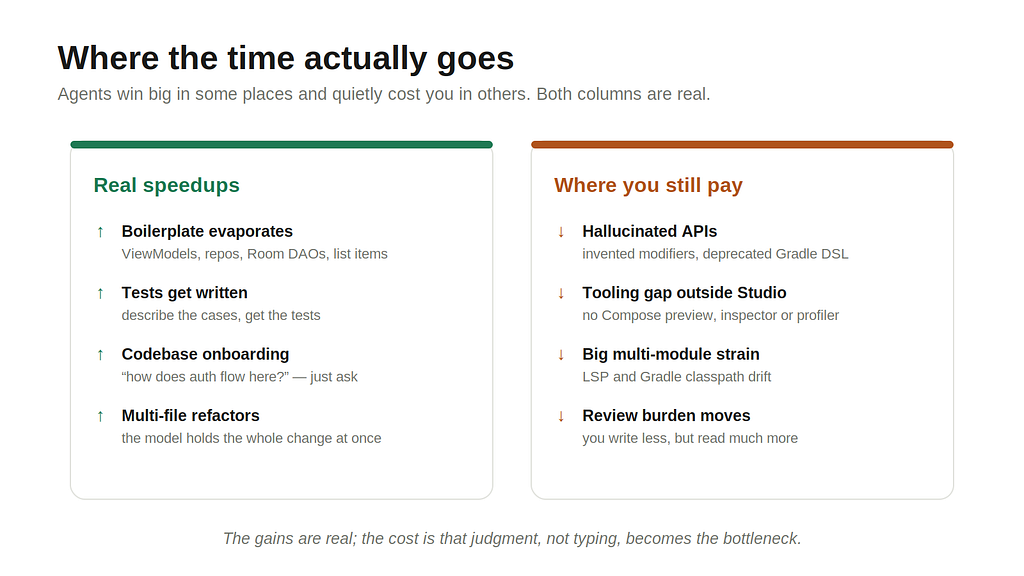
Boilerplate evaporates. ViewModels, repository layers, Retrofit service definitions, Room entities and DAOs, the seventeenth nearly-identical Composable list item — this is work agents do well and almost instantly. Unit tests too; describing the cases you want and letting the agent write them is faster than writing them by hand, and it nudges you toward actually having tests.
Onboarding to an unfamiliar codebase gets dramatically easier. “Explain how authentication flows through this app and which files own it” used to be an afternoon of grep. Now it’s a question. Claude Code’s exploration subagent is built for exactly this.
Refactors that span many files — renaming a concept, migrating from one pattern to another, threading a new parameter through a call chain — are where the multi-file agents earn their keep. The model holds the whole change in its head better than I hold it in mine across twenty open tabs.
Where the hype quietly falls apart
I’d be doing you a disservice if I stopped at the wins. The honest picture has sharp edges.
Agents hallucinate APIs. They’ll confidently call a Compose modifier that doesn’t exist or use a Gradle DSL that was deprecated two versions ago. The fix is unglamorous: you have to know enough to catch it. These tools accelerate competent engineers and quietly mislead beginners who can’t tell a real androidx import from an invented one.
The Android tooling gap is real outside Studio. Cursor and terminal agents can’t show you a Compose preview, can’t run the Layout Inspector, can’t profile a jank. For UI-heavy or performance-sensitive work, you’re back in Android Studio anyway. The dual-IDE dance is the current price of admission.
Large, multi-module projects strain the editor’s understanding. The standalone Kotlin language server still struggles with big Android projects and generated sources, and an agent’s mental model of your Gradle classpath can drift from what the Android Gradle Plugin actually believes. On a small app this never bites. On a 40-module monorepo, it does.
And the review burden doesn’t disappear — it moves. You write less code and read more of it. A team that ships twice as fast but reviews half as carefully hasn’t gotten faster; it’s borrowed velocity against future bugs. The bottleneck quietly relocates from typing to judgment, which is a better bottleneck to have, but only if you respect it.
If you’re leading a team, not just writing code
For product and engineering leads, the interesting question isn’t “is the code good” — it’s “what changes about how we work.”
Three things, in my experience. Velocity on well-scoped, conventional work goes up a lot; velocity on genuinely novel or ambiguous problems barely moves, because the hard part there was never typing. So the gains are uneven, and planning around an even “20% faster” number will mislead you.
Second, code review becomes the load-bearing process. It was always important; now it’s the main place quality is enforced, because a meaningful share of the code wasn’t written by a human who can explain every line. Teams that already had a strong review culture adapt smoothly. Teams that treated review as a rubber stamp get exposed.
Third, the boring governance stuff matters more than it sounds. Where does your code go when an agent processes it? Google’s paid Gemini tiers and Anthropic’s paid plans don’t train on your code, but “which plan are we on” is suddenly a real question for a legal team, not just procurement. And in academic or formal contexts, AI-generated code and prose carry a recognizable fingerprint — generic structure, over-explained comments, a certain flatness — that reviewers increasingly notice. If output quality and originality matter for your context, the agent gives you a draft, not a deliverable. The editing pass is not optional.
Where this leaves us
The most accurate thing I can say is that the job changed shape rather than getting smaller. I spend less time writing Compose boilerplate and more time deciding what to build, reading diffs critically, and catching the agent’s confident mistakes before they reach a user. That’s a trade I’ll take — but it’s a trade, not a free lunch, and anyone selling it as a free lunch hasn’t shipped anything real with these tools.
If you’re starting, start small and stay in the loop. Pick one agent, put an AGENTS.md or CLAUDE.md in a real project so the output matches your style, and give it tasks you could verify yourself in a code review. Wire the build into the loop so it sees its own errors. Keep Android Studio nearby for the things only it can do. The engineers getting the most out of this aren't the ones who trust the agent most — they're the ones who know exactly when not to.
References
- Agent Mode — Android Studio (Google official docs) — https://developer.android.com/studio/gemini/agent-mode
- About Gemini in Android Studio — tiers, availability, and the Android CLI for agent work outside the IDE — https://developer.android.com/studio/gemini/overview
- Customize Gemini using AGENTS.md files — https://developer.android.com/studio/gemini/agent-files
- Agentic AI takes Gemini in Android Studio to the next level — Android Developers Blog (Agent Mode announcement) — https://android-developers.googleblog.com/2025/06/agentic-ai-takes-gemini-in-android-studio-to-next-level.html
- Supercharge your Android development with 6 expert tips for Gemini in Android Studio — Android Developers Blog, Mar 2026 (Otter 3, New Project Assistant) — https://android-developers.googleblog.com/2026/03/supercharge-your-android-development.html
- Claude Code overview — Anthropic docs (terminal agent, subagents, MCP) — https://docs.claude.com/en/docs/claude-code/overview
- Cursor changelog — current version and release notes — https://cursor.com/changelog
- The Best Android Development Setup for VSCode/Cursor — Teja Karlapudi, Medium (build-and-run loop, running agents in Cursor) — https://medium.com/@teja2495/the-best-android-development-setup-for-vscode-cursor-6ea4e2db4471
- Android Development in Cursor: An Expert Deep-Dive — Dre Dyson (LSP limits, no Compose preview/Profiler, Gradle drift) — https://dredyson.com/android-development-in-cursor-an-expert-deep-dive-on-kotlin-lsps-and-real-world-workflows-that-actually-work/
- Claude Code Agent Teams, Subagents, and MCP: The 2026 Playbook — Developers Digest — https://www.developersdigest.tech/blog/claude-code-agent-teams-subagents-2026
Tools and versions referenced are current as of June 2026.